

🔐 When Law Enforcement Accesses Your iMessages: What You Need to Know
Apple’s end-to-end encryption protects your messages — but iCloud backups may still expose them.

🧩 How iMessage Encryption Works
If investigators can’t access an iCloud backup, they don’t get direct access to your iPhone’s iMessages from Apple — because Apple cannot decrypt or read end-to-end encrypted content stored only on the device. However, there are a few lawful ways investigators can still acquire those messages.
📱 When Data Is Stored Only on iPhone
Apple’s Law Enforcement Guidelines confirm that Apple does not keep iMessage content on its servers once delivered, and cannot retrieve messages directly from an iPhone without a backup.
If the phone itself is seized, law enforcement can perform forensic extraction using tools like Cellebrite or Grayshift’s GrayKey. These specialize in bypassing local security protections to access stored chats and data, depending on the iOS version and hardware encryption limits.
Apple cannot directly assist in decrypting a locked iPhone (post–iOS 8), as it does not retain the passcode or encryption key; investigators instead rely on these forensic vendors or the device owner’s cooperation.
🧾 A Real-World Wake-Up Call: How Investigators Reach Your Messages 📞📁🔎

When a high‑profile investigation — say, allegations of a rigged NBA game — needs to collect communications, investigators have a few lawful routes. If messages are only on a sealed device, the path is tougher; but if backups exist, the shortcut is often iCloud.
Here’s the typical flow investigators follow (simplified):
Subpoena or Warrant to Service Providers. Investigators can serve Apple with a lawful subpoena or court‑ordered warrant under the Stored Communications Act requesting the account holder’s iCloud backups and associated metadata. If Messages were synced to iCloud, Apple can produce the backup data because it holds the keys for those encrypted copies.
Device Seizure & Forensic Extraction. If the phone is physically seized, forensic vendors (Cellebrite, GrayKey) may extract message databases directly from the device — depending on iOS version and hardware protections. This method bypasses the need to go through Apple but requires access to the physical phone and specialized tools.
Alternative Sources. Investigators also pull third‑party copies: carrier SMS logs, backups on a suspect’s computer, cloud providers, or synced copies on other devices under the same Apple ID. These can contain the same conversations or helpful timestamps.
Cooperation & Legal Pressure. Sometimes, the quickest path is voluntary cooperation — a target or witness turning over a phone, credentials, or consenting to a search. In complex investigations, prosecutors combine all these avenues to build a complete picture.
What this means for you: if your messages were part of an iCloud backup, Apple can be legally compelled to hand them over. If your phone never synced to iCloud and was never seized, your on‑device messages are far harder to obtain. That gap is the exact distinction explained in “When Data Is Stored Only on iPhone.”
☁️ If iCloud Sync or Backup Is Enabled
iMessages synced through iCloud Backup or “Messages in iCloud” are accessible to Apple under a lawful subpoena, since those backups contain the encryption keys.
These backups include device settings, iMessage, SMS, MMS, and metadata. Agents typically request the user’s Apple ID data, which Apple provides once a valid warrant is issued under the Stored Communications Act.
⚖️ Summary: What Apple Can and Cannot Do
If Apple is asked “direct from iPhone,” it generally cannot assist unless:
The iPhone is backed up to iCloud, or
The physical phone itself is seized for forensic extraction.
Apple’s end-to-end encryption protects messages on-device only. Once an iCloud backup exists, those protections weaken because Apple holds the keys to decrypt that data for legal requests.
🔧 How to Keep Your iMessages Private
If you want your iPhone to store all messages only on the device—not on Apple’s iCloud servers—you can completely disable iCloud backup and iCloud Message syncing. Doing so ensures your texts and iMessages are stored locally and never uploaded.
Step 1: Turn Off iCloud Backup
Open Settings.
Tap your Apple ID name at the top.
Go to iCloud → iCloud Backup.
Toggle Back Up This iPhone off.
Confirm by selecting “Turn Off.”
This stops future automatic backups to iCloud.
Step 2: Turn Off Messages in iCloud
Still in Settings, go to [Your Name] → iCloud → Show All → Messages.
Turn off the switch for Sync this iPhone.
Prevents your iMessages and SMS from uploading or syncing to iCloud or other Apple devices connected to your Apple ID.
When prompted, choose “Disable and Download Messages.”
Step 3: Optional Privacy Measures
Disable iCloud Drive, iCloud Photos, and Keychain to prevent broader Apple data syncs.
Use encrypted local backups on a Mac (Finder) or PC (iTunes).
When Messages in iCloud and iCloud Backup are both off, all your message history, photos, and attachments remain only on your iPhone—not in Apple’s servers.
🧱 Advanced iPhone Privacy Settings Checklist
iCloud and Backup
Settings → [Your Name] → iCloud → iCloud Backup → Off
Prevents automatic cloud uploads of all data.
Settings → [Your Name] → iCloud → Show All → Messages → Off
Keeps iMessages local only.
Settings → [Your Name] → iCloud → Manage Storage → Backups → Delete any old backups.
Location Services
Settings → Privacy & Security → Location Services → Off (or per app)
If you need maps, set them to “While Using” only.
For Camera, set to Never to stop photos embedding location metadata.
Photos → Metadata → Disable “Include Location Information”.
Messages and Communication
Settings → Messages
Turn Send as SMS Off — prevents fallback to unencrypted text.
Turn Filter Unknown Senders On — helps block phishing.
Turn Message History → Keep Messages → 30 Days or custom for auto-deletion.
Settings → FaceTime → Reachable at: Only list your trusted number or remove your Apple ID email.
Network and Tracking
Settings → Privacy & Security → Tracking → Allow Apps to Request to Track → Off
Stops apps from linking your metadata for profiling.
Settings → Wi-Fi → (i icon next to your network) → Enable Private Wi-Fi Address.
Settings → Cellular → Cellular Data Network: Disable unnecessary carrier settings that share diagnostics.
Analytics and Advertising
Settings → Privacy & Security → Analytics & Improvements → All Off
Settings → Privacy & Security → Apple Advertising → Personalized Ads → Off
Lockdown and Security
Settings → Face ID & Passcode → Require Passcode Immediately
Settings → Location Services → System Services → Significant Locations → Off
Settings → Safari → Privacy & Security → Prevent Cross-Site Tracking → On
Lockdown Mode (very strong protection) → Settings → Privacy & Security → Lockdown Mode → On
App Permissions
Go through Settings → Privacy & Security and review each category:
Disable permissions for apps you don’t trust (Camera, Microphone, Contacts, etc.).
Avoid “Always” in location and microphone permissions.
Optional Advanced Privacy
Enable VPN (privacy-respecting provider, not free ones).
Use App Store → Safari → Advanced → Use Private Browsing for web.
Delete old iCloud connections from Settings → [Your Name] → Password & Security → Devices you no longer use.
If you apply all these settings:
iCloud will hold no backups or messages.
Your iMessage data stays only on-device.
Metadata and location trails will be minimal.
Your phone becomes significantly harder to track or profile through normal network surveillance methods.
🛡️ Next-Level Privacy Apps: Strengthen Your Defenses
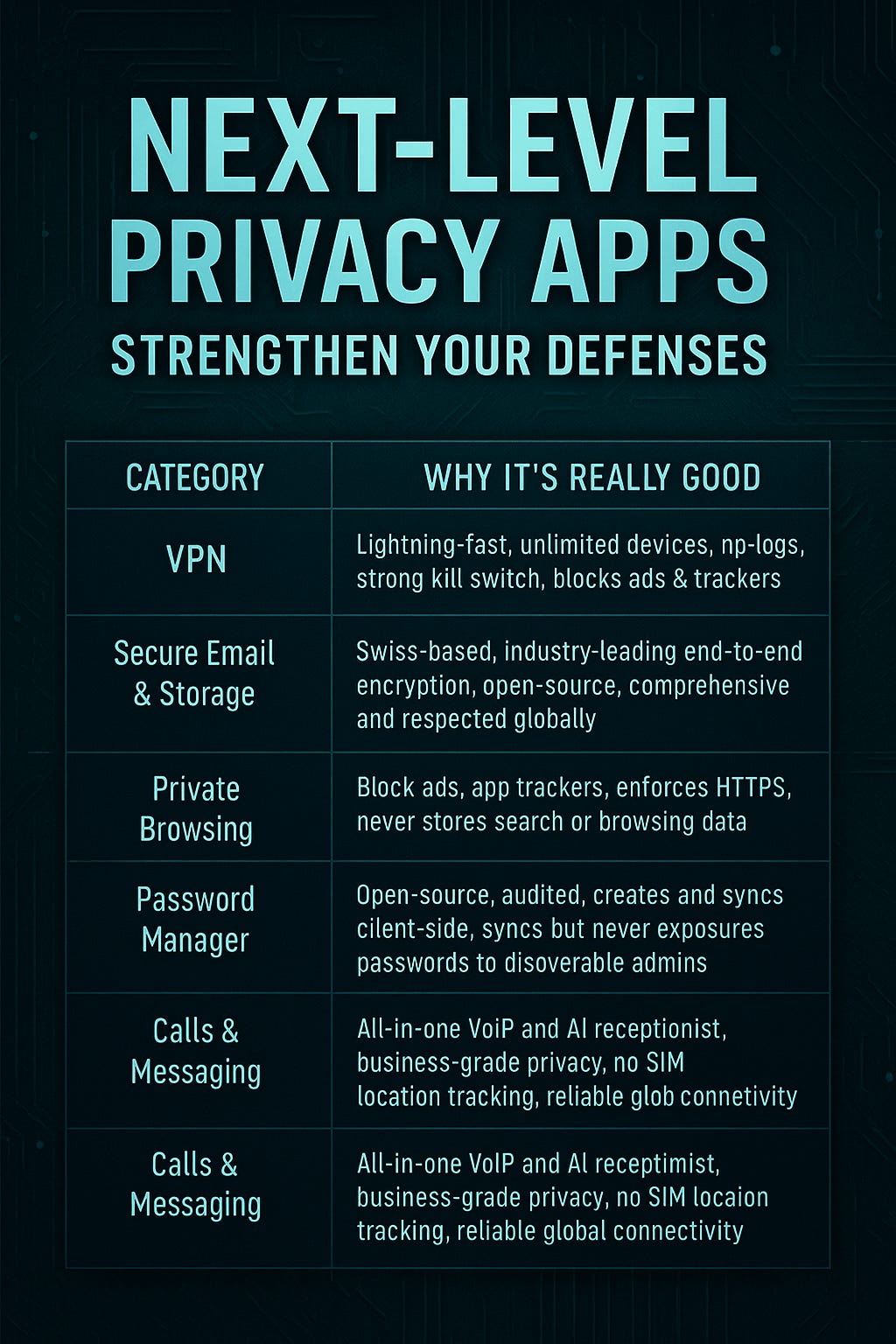
VPN: Surfshark VPN
Email & Storage: Proton
Private Browsing: DuckDuckGo
Password Manager: Bitwarden
Calls & Messaging: M1, iOS App
Each of these apps adds an extra layer of security and autonomy. Use them to plug gaps left by iOS’s built‑in privacy tools and ensure that your metadata, files, and communications remain as private as possible.
⚠️ Disclaimer: Limitations of These Privacy Steps

🧠 Stay Aware: Protecting Your Digital Privacy
Your iMessages might be private — until they’re not. Disable iCloud backups if you want true end-to-end encryption, and remember: convenience often comes at the cost of control.
⭐ Subscribe to Unpacked: AI & Current Events for weekly privacy breakdowns, digital security tips, and real-world insights into how technology affects your freedom.
💬 What’s your stance — should Apple ever assist in unlocking iPhones?
🔁 Restack and share to help others understand how easily privacy can be compromised.
I’ve been simplifying my digital setup lately, and it’s wild how privacy often depends on clarity in what we turn on or off. Systems make freedom sustainable.
Do you think most people trade privacy for convenience without realizing it?
Wow, thanks for this gold!
I hadn't thought about this type of data protection. So, does that mean any backups and synchronisations are potential threats to your data being stolen?